September 2, 2026
6 min
Discover the key metrics orthodontists can use to track leads, consultations, treatment starts, marketing costs, and ROI for smarter growth decisions.

June 10, 2026
12 min
Discover the main causes of website form abandonment and proven strategies to improve form completions, increase inquiries, and convert more patients.
Dental website form abandonment remains one of the biggest leaks in the patient acquisition funnel. You can have a great website, strong Google rankings, and a steady flow of visitors, but if prospective patients start your inquiry form and leave before submitting it, potential appointments are slipping through the cracks.
Every day, patients visit dental websites with genuine intent. They're researching treatments, comparing providers, checking availability, or looking for a practice they can trust. They click on a form, begin the process, and then somewhere between interest and action, the momentum fades. The appointment never gets booked, and the opportunity is lost.
There is rarely a single reason behind form abandonment. Some patients are still weighing their options. Others get tripped up by long forms, poor mobile experiences, slow page speeds, or uncertainty about what happens after they hit submit. Sometimes, it only takes one small hurdle to turn a motivated patient into a missed opportunity.
The encouraging part is that most form abandonment is fixable. And the practices that figure it out don't just fill their schedules; they dramatically reduce their cost per new patient while creating a better experience from the very first click.
This guide walks you through everything: why patients abandon, what to fix first, and how the right combination of design, follow-up strategy, and dental lead management software can turn your website into a genuine patient acquisition machine.
Let’s talk numbers for a moment, not to overwhelm you, but because the math here is genuinely eye-opening for most dental practices.
An average form abandonment rate of around 70% is seen across healthcare websites. At the same time, the cost to acquire a new dental patient through paid ads typically sits between $150 and $400, and research shows patients are up to 3 times more likely to book when followed up within 5 minutes of starting a form. On top of that, 57% of healthcare consumers say a poor online experience makes them less likely to choose a provider.
Now bring that into a real practice scenario. If you are spending around $3,000 a month on digital advertising and 70% of form starters drop off before submitting, a large portion of that spend is effectively not converting into booked appointments. It is not that your ads are underperforming; it is that the patient journey is breaking after the click.
Most dental marketing conversations focus heavily on driving more traffic. More ads. More SEO. More visibility. But often, the real issue is not at the top of the funnel; it is what happens once the patient actually shows intent. It is like filling a bucket that has a slow leak at the bottom.
The reality is simple. Even a 20% improvement in form completion rates can significantly increase new patient bookings without increasing ad spend, purely by converting more of the traffic you already have.
Before you fix something, you have to understand it. Patients don't abandon forms randomly; there are very specific patterns, and once you see them, you can't unsee them.
This is the number one culprit. Many dental websites still use forms that ask for insurance information, date of birth, reason for visit, preferred dentist, preferred day and time, emergency contact, and more, all before a patient has even met you or decided if they like you.
Think about it from the patient's perspective: they just want to see if they can get an appointment. Being asked to fill out what feels like a medical intake form online is a hard stop for most people. Practices that have already transitioned to digital patient intake forms often find it easier to streamline the booking experience and reduce unnecessary friction. They'll close the tab and call someone else.
Google's research has consistently shown that 53% of mobile users abandon a page that takes more than 3 seconds to load. And dental websites, especially those with image-heavy homepages and embedded booking widgets, are notorious for slow load times. By the time your form actually appears, half your audience is already gone.
Many people feel anxious about healthcare appointments. When a form does not indicate what happens after submission, such as when they will be contacted, how the process works, or what to expect next, that uncertainty can create hesitation. And when people hesitate, they're far more likely to abandon the form altogether.
More than 60% of dental website traffic now comes from smartphones. Yet most dental forms were designed for desktop first, or sometimes, only for desktop. Tiny text fields, buttons that are hard to tap, and forms that require excessive scrolling are all major abandonment triggers on mobile.
Would you enter your personal information on a page with no reviews, no photos, and no clear indication of who these people are? Most patients won't either. When a form page feels generic or unbranded, patients second-guess themselves.
Some patients, particularly older adults, simply prefer to call. If your form is the only obvious option and your phone number isn't easy to find, you'll lose them. Giving patients multiple ways to connect, such as a form, phone, live chat, or text message, can dramatically improve overall conversions.
With the right combination of website optimization, patient follow-up processes, and dental lead management tools, practices can reduce form abandonment and convert more website visitors into genuine patient inquiries.
Let's explore some proven strategies that can help you capture more opportunities and turn website interest into booked appointments.
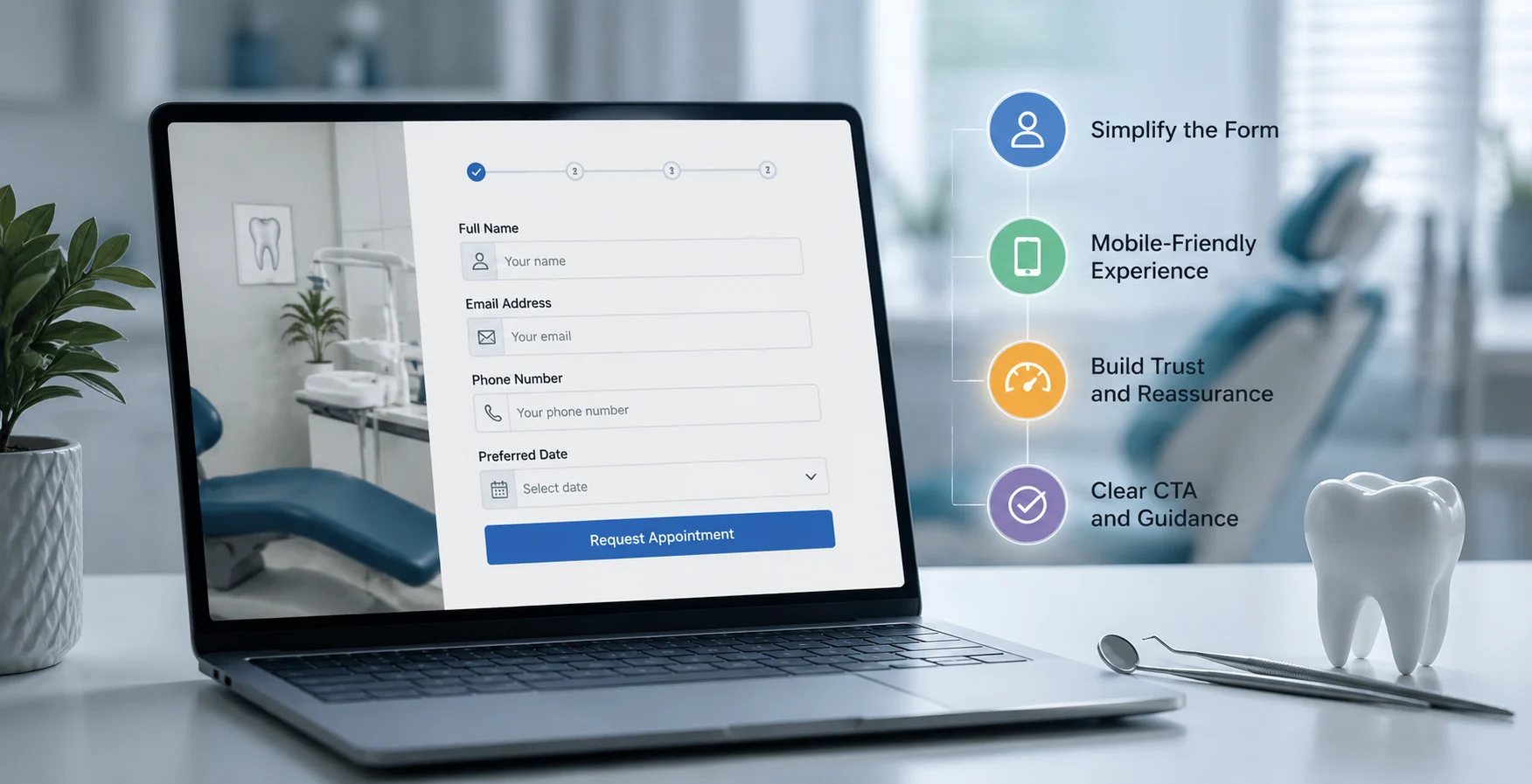
Complex form design has the potential to frustrate patients who are already ready to book. The easier and more intuitive the process feels, the more likely patients are to complete their inquiry and take the next step towards treatment.
Cut Your Form Down to the Bare Minimum
Aim for no more than 3 to 5 fields on your initial contact form. Name, phone number, email, and a simple "What brings you in?" dropdowns are usually enough. Everything else, including insurance details, medical history, and scheduling preferences, can be collected later.
Two-step forms often perform even better. The first step captures basic contact information, while the second gathers additional details. Once people start the process, they're far more likely to finish it.
Make Your Submit Button More Compelling
The button at the end of your form matters more than most practices realize. Generic labels like "Submit" rarely perform well. Instead, use action-focused wording such as
Show a Progress Indicator
If your form has multiple steps, show patients exactly where they are in the process. A simple "Step 1 of 2" message or progress bar helps reduce uncertainty and encourages completion.
Use Smart Inline Validation
Nothing frustrates a user more than filling out an entire form, hitting submit, and then being shown errors one by one. Real-time inline validation, where the form gently confirms each field as it's completed, creates a much smoother experience and reduces frustration-based abandonment.
Remove Distractions Around the Form
When someone is filling out your form, you want their full attention on completing it. Consider removing navigation menus, extra CTAs, and unrelated content from your form landing page. A clean, focused form page consistently outperforms cluttered ones.
Test your own form on a mobile phone. Count the number of taps it takes to complete and pay attention to how quickly it loads. If the experience feels frustrating to you, it will likely feel frustrating to your patients too.
More than 60% of dental website traffic arrives on a smartphone. Yet many dental booking forms still feel frustrating on a small screen. That's because mobile optimization is not the same as responsive design. Responsive design means the form fits on a phone. Mobile optimization means the form is genuinely easy to use on a phone.
Mobile Form Optimization Checklist
Test on Real Devices, Not Browser Simulators
Developer tools offer mobile preview modes, and they're useful as a starting point, but they should never be your final test. Complete your own appointment request form on a real iPhone and a mid-range Android device using cellular data, not office Wi-Fi. This will quickly reveal friction points that simulators often miss.
Better still, hand your phone to someone who has never seen your website before and ask them to complete the form without assistance. You'll learn more from watching a real user navigate your booking process for a few minutes than you will from hours spent analyzing reports.
Page Speed Is a Mobile-First Priority
Google has clearly established that 53% of mobile users abandon a page that takes longer than 3 seconds to load. Dental websites, with large hero images, embedded scheduling calendars, Instagram feed widgets, multiple chat tools, and stacked advertising pixels, routinely load in 6 to 10 seconds on mobile connections.
Use Google PageSpeed Insights to identify and prioritize performance issues. Remember, a poor mobile experience doesn't just reduce conversions. Because Google uses mobile-first indexing, it can also affect your visibility in search results.
Sometimes the biggest reason patients abandon a form has nothing to do with the form itself. It comes down to trust. Dental anxiety remains one of the most common healthcare concerns in the United States, and even interested patients can hesitate if a website doesn't make them feel confident and comfortable.
Put Reviews Where Decisions Happen
Displaying authentic patient reviews next to your booking form can provide reassurance at the exact moment a patient is deciding whether to reach out. The most effective reviews are specific and relatable, highlighting experiences such as friendly staff, clear communication, gentle care, or a comfortable visit. These real patient stories help build confidence and reduce the hesitation that often leads to form abandonment.
Real Team Photos Beat Stock Photography Every Time
Stock photos of smiling strangers in white coats are everywhere on dental websites. Patients know them immediately, and they create a subtle sense of inauthenticity that's hard to name but easy to feel. Real photos of your actual team, your actual office, and your actual patient results signal something no stock photo library can replicate: these are real people, this is a real place, and this actually happens here.
Answer the Questions Patients Are Too Nervous to Ask
Most prospective patients have two unspoken fears sitting between them and your booking form: "Is this going to hurt?" and "Can I actually afford this?" They rarely ask these questions directly; they just leave your website. Address both fears proactively, right on your form page:
Anxiety-Reducing Copy to Place Near Your Booking Form
Make Trust Signals Easy to Spot
Professional memberships, years of experience, awards, certifications, and patient satisfaction ratings provide reassurance that patients are in safe hands.
Reassure Patients About Privacy
A surprising number of patients hesitate before filling out dental forms online because they worry about being spammed, having their information sold, or being added to marketing lists without consent. Adding a simple caption below the form, such as "We take your privacy seriously. Your details will only ever be used to contact you about your appointment" helps remove a friction point that many practices do not even realize exists.
Every field on your booking form asks patients for a little more effort. The more effort required, the more likely they are to leave before hitting submit. That's why some of the highest-converting dental websites ask for surprisingly little information upfront.
Start With the Essentials
Your online form isn't a patient intake packet. It's simply the beginning of a conversation. In most cases, a patient's name, phone number, email address, and reason for visit are all you need to get started.
Show Only What Matters
If your form supports conditional logic, use it. Display questions based on a patient's selections so the experience feels relevant, streamlined, and personalized rather than overwhelming.
Let Your Team Handle the Rest
Insurance details, medical history, preferred appointment times, and other administrative information can be collected during the confirmation call or through a secure patient portal. The easier it is to take the first step, the more patients will take it.
Implement Smart Follow-Up for Abandoned Forms
Abandoned form follow-up is the process of reconnecting with prospective patients who started an appointment request but left before submitting it. In many cases, these patients were interested in booking but became distracted, interrupted, or simply needed more time before taking the next step.
Follow-up works best when it happens quickly. A reminder sent within minutes or hours of abandonment is far more effective than one sent days later, when the patient may have already chosen another provider or lost interest altogether.
To encourage patients to return, follow-up messages should be friendly, reassuring, and easy to act on. A direct booking link, clear next steps, or a reminder of your new patient offer can help rebuild momentum and guide patients back to completing their inquiry.
Add Compelling Calls-to-Action and Patient Incentives
Even the most well-designed dental website can struggle to generate inquiries if patients aren't given a clear reason to take action. Strong calls-to-action help guide visitors toward the next step, while patient incentives can reduce hesitation and encourage faster decision-making.
The most effective CTAs are specific, action-oriented, and clearly explain what patients can expect after submitting their inquiry. Likewise, offers such as new patient specials, free consultations, or same-day emergency appointments can make reaching out feel more valuable and less intimidating.
When combined strategically throughout the page, compelling CTAs and patient-focused incentives can significantly increase form completions and turn more website visitors into scheduled appointments.
Modern form tracking tools give dental practices a much clearer picture of how patients interact with online booking forms. Instead of simply seeing how many inquiries were submitted, you can identify exactly where prospective patients lose momentum during the process.
For example, tracking may reveal that most visitors complete the basic contact fields but leave when asked for insurance details, date of birth, or other information that feels unnecessary at that stage. These insights make it easier to remove friction, simplify the booking experience, and improve completion rates.
Tracking also helps identify which pages generate the highest-quality inquiries, whether that's a dental emergency page, Invisalign landing page, or your homepage. Access to detailed lead attribution and tracking insights allows practices to understand which marketing efforts are actually driving booked appointments and where conversion bottlenecks exist.
Focus on the Metrics That Matter
The most valuable data points to monitor include the following:
When you understand how patients interact with your forms, every website, marketing, and conversion decision becomes easier to make and far more effective.
Your website content should naturally guide visitors toward taking action rather than forcing them straight to a booking form. Educational pages, treatment guides, FAQs, and blog posts can help answer questions, build trust, and create confidence before a patient is ready to inquire.
Here are a few ways to make your content work harder for conversions:
Form abandonment is not a technology problem. It's a patient experience problem that happens to live on your website, and that makes it entirely within your control to fix. You don't need to wait for a new website build, a new marketing agency, or a bigger budget. The changes that matter most are often the ones that cost the least: shorter forms, clearer CTAs, genuine trust signals, and a follow-up system that treats every inquiry like the opportunity it actually is.
The practices winning right now aren't necessarily the ones spending the most on advertising. They're the ones that are easy to find, easy to trust, easy to book, and fast to respond. Every fix you make to your forms, your tracking setup, and your lead management system is an investment that compounds over time, lowering your cost per new patient, filling your schedule more reliably, and building a reputation for being a practice that actually makes things easy.



September 2, 2026
6 min
Discover the key metrics orthodontists can use to track leads, consultations, treatment starts, marketing costs, and ROI for smarter growth decisions.
August 31, 2026
8 min
Call recordings help dental practices uncover missed booking opportunities, improve patient communication, train front desk teams, and connect calls to revenue.

August 31, 2026
8 min
Learn how after-hours patient communication helps dental practices stay responsive, support patients, capture bookings, and reduce front desk pressure.
Sign Up Now & Someone from Our Team Will Be in Touch Shortly!
Use the form below to send us a message, and we’ll get back to you as soon as we can.
.webp)
Track every marketing dollar and optimize patient conversions with ConvertLens. Gain valuable insights from your campaigns, ensuring you never miss a potential patient. Maximize ROI and grow your practice effortlessly.
-p-500.webp)