October 28, 2026
8 min
How traditional voicemail loses new dental patients, and what a reliable call-handling system looks like instead.
August 7, 2026
6 min
Learn how duplicate CRM records and poor data hygiene break dental marketing attribution, distort reports, and lead to bad budget decisions, plus how to prevent and fix these issues.

A dental group we worked with was convinced their Google Ads campaigns had stopped working. Cost per lead had crept up for three straight months, and the marketing team was one budget review away from pulling spend entirely. The campaigns were fine. The problem was sitting in their CRM the whole time: one patient, Sarah Mitchell, existed as four separate records. She'd called the front desk once, filled out a web form once, been entered again by a hygienist after a phone reschedule, and synced in from the practice management system after her first visit. Four records, four different lead sources, and three of those sources got credit that belonged somewhere else.
This is what CRM data hygiene actually protects. It is not a housekeeping task you get to when things are slow. It is the layer underneath every attribution report, every cost per acquisition number, and every decision about where to spend next month's ad budget. When that layer is dirty, the reporting on top of it is not just slightly off. It is actively pointing you toward the wrong channels.
CRM hygiene's meaning gets debated in generic marketing content, but for a dental practice it comes down to one question: does every patient exist in your system exactly once, with accurate and complete information attached to that single record? That is the whole definition. A CRM with good hygiene has no duplicate patients, no orphaned leads sitting with blank source fields, no contact records where the phone number belongs to one person and the email belongs to another because two records got merged carelessly.
Data hygiene is different from a one time cleanup, and that distinction matters more than most practices realize. A cleanup is a project with an end date. Hygiene is a standing practice, closer to how you'd think about infection control in a clinical setting than a spring cleaning task. You do not disinfect an operation once a year and call it done. You build a process that keeps it clean by default, and you check it regularly because you know new contamination is constantly entering the system. Dental CRMs work the same way. New duplicate risk enters every single day, from every direction a lead can reach your practice.
Generic CRM advice usually assumes one team entering data through one interface. Dental practices rarely work that way, which is part of why duplicate rates in CRMs used across healthcare settings tend to run higher than the 10 to 30 percent range reported across B2B systems generally.
1) Practice management system sync collisions.
Most dental CRMs pull patient records from a PMS like Dentrix, Eaglesoft, or Open Dental on a schedule. If that sync runs on loose matching rules, a patient who calls in as a new lead before their PMS record syncs over gets created twice: once as a marketing lead, once as a clinical patient. The two records never merge because the sync job matched on an exact email string and the lead form used a different email than the one on file at check in.
2) Entry from more than one location for the same household.
A family with three kids at a general practice that also sees pediatric patients might generate six or seven touchpoints across two locations before anyone realizes they are one household. Each location's front desk enters the parent as a new contact because neither system shows what the other location already has on file.
3) Manual front desk re entry.
A patient reschedules by phone, the call gets logged as a new inquiry instead of an update to the existing record, and now there are two entries with slightly different spellings of the same last name. This is the single most common source we see, and it is almost never anyone's fault. It is what happens when a busy front desk is juggling five things and the CRM makes creating a new contact faster than searching for an existing one.
4) Multiple lead capture points.
A patient can enter your funnel through a Google Ads landing page, a Facebook lead form, an online scheduling widget, a chatbot, and a phone call, sometimes within the same week while comparing practices. Every one of those tools can write directly into the CRM. Without deduplication rules running at the point of entry, that is up to five separate records for one person, each one claiming a different acquisition channel.
It is tempting to treat duplicate records as a cosmetic problem, something that makes your contact list look messy but does not really cost anything. That framing misses what is actually happening underneath the surface.
Attribution works by tracing a patient's path from first touch to booked appointment to completed treatment, then rolling that value back up to whichever channel or campaign gets credit. The moment a single patient is split across multiple records, that path breaks into fragments. The channel that captured a duplicate lead form fill gets counted as a full conversion, even though the actual booking happened through a different, unrecorded touchpoint tied to a separate record. Your reporting shows five channels each getting partial credit for what was really one patient's single decision to book.
This is where the connection to marketing attribution data quality becomes concrete rather than theoretical. Run the math on a practice spending fifteen thousand dollars a month across paid search and paid social. Reported duplicate rates across CRM systems generally fall somewhere between 10 and 30 percent, and dental intake, with its extra entry points, tends to sit toward the higher end of that range. If duplicate records are inflating lead counts by even 20 percent, your true cost per lead is roughly 20 percent higher than what the dashboard shows. Budget decisions made off that dashboard will systematically favor whichever channel happens to generate the messiest lead flow, the one most prone to duplicates, because that channel's reported cost per lead looks artificially cheap. You end up rewarding the noisiest data source instead of the best performing one.
Stale and unreconciled records compound the problem beyond attribution alone. A contact record that never gets updated after a phone number change, a household move, or a name change following marriage becomes a dead end for remarketing and reactivation campaigns, and every message sent to it is a wasted touch that still shows up as a cost in your campaign reporting. Left unmanaged for long enough, CRM data hygiene issues do not just misallocate this month's budget. They erode the accuracy of every forecast and every reactivation list built on top of that data going forward.
For a full breakdown of how attribution models handle these inputs and where they can mislead you even with clean data, see our guide on attribution models for dental marketing.
A few patterns tend to show up well before anyone runs a formal audit.
Your total contact count keeps climbing faster than your new patient count. If contacts are growing at twice the rate of actual new patients month over month, duplicates are almost certainly accumulating faster than anyone is catching them.
Campaign level lead volume and appointment level booking volume stop lining up the way they used to. When a campaign report says 40 leads came in but the schedule only shows 22 new patient exams booked in that window, and that gap is wider than your historical no show and non response rate would explain, duplicate or fragmented records are a likely culprit.
Front desk staff mention recognizing a "new" lead's name from a previous call. If your team is manually catching what the CRM should be catching, that is a signal the system's matching rules are too loose or missing entirely.
Two campaigns both claim credit for the same patient in month end reporting. This one is the clearest tell of all, because it means the same person exists under multiple source tags, and whichever campaign happened to sync first or alphabetically first is winning credit it may not deserve.
Fixing this does not require ripping out your CRM or freezing lead flow for a month. It requires a sequence, done in the right order, so you are not merging records faster than you can review them accurately.
1) Step one: audit before you touch anything.
Export your full contact list and run a duplicate detection pass using fuzzy matching rather than exact matching alone. Fuzzy matching compares name, email, phone, and address in combination and assigns a confidence score to likely duplicate pairs, which catches the "Sarah Mitchell" versus "S. Mitchell" versus a typo'd phone number cases that exact string matching misses entirely. Most CRMs built for dental practices and general purpose tools connected to healthcare workflows support this natively or through an integration; if yours does not, this is worth flagging before you build anything else on top of unreliable contact data.
2) Step two: establish merge rules before you merge a single record.
Decide in advance which record wins when two conflict. A common, defensible rule set: the most recently updated phone number wins, the earliest recorded lead source wins (because that reflects true first touch, which matters for attribution), and any record with a completed appointment history takes priority as the surviving record over one with no appointment history. Write this down. Do not improvise merge decisions one at a time, because inconsistent rules create a second layer of mess that is harder to untangle than the original duplicates.
3) Step three: merge in controlled batches, not all at once.
Start with your highest confidence matches, the pairs your fuzzy matching flagged above a 90 percent confidence threshold, and merge those first. Review a sample manually before committing to the full batch. Move to lower confidence matches only after you have confirmed the high confidence batch merged cleanly, with no lost appointment history or overwritten notes.
4) Step four: run again on attribution reporting on the cleaned data and compare.
This is the step most cleanup projects skip, and it is the one that actually proves the work mattered. Pull the same date range you reported on before the cleanup and run it again against the deduplicated contact list. You should see cost per lead adjust upward for whichever channel had been benefiting from inflated counts, and you should see a clearer, single path for patients who previously looked like several disconnected leads. That before and after comparison is also the number to bring to a budget conversation, because it shows leadership exactly how much the dirty data had been distorting decisions.
A cleanup without prevention is a temporary fix. Reported duplication rates that get knocked down through a one time merge tend to creep most of the way back within one or two quarters if nothing changes about how new records enter the system.
Build duplicate checking into every entry point, not just the CRM's back end. Your lead forms, scheduling widget, chatbot, and phone intake script should all check for an existing match before creating a new contact, using fuzzy logic rather than exact match so that a slightly different email or a nickname does not slip through. Assign clear ownership. Someone on your team, whether that is a practice manager or a marketing coordinator, should own a monthly duplicate check as a standing task, not a project that gets scheduled when someone finally notices the reports look off. Standardize how staff enter names, phone numbers, and addresses at the front desk, since inconsistent formatting is one of the quieter ways duplicate detection tools miss real matches. And connect your PMS sync settings to match on more than one field. Email alone, or phone alone, will always miss patients who used a different contact method across touchpoints.
ConvertLens' dental CRM is built around this problem specifically. It runs fuzzy matching at the point of entry across every lead source, from paid ad forms to phone intake to PMS sync, so duplicate risk gets caught before a second record is ever created rather than cleaned up after the fact. For a look at what the platform checks for beyond deduplication, our guide to the core components of a dental CRM walks through the full picture.
Most practices start with a manual approach, because it feels like the lowest risk option. It rarely stays cheap once you account for the ongoing hours it takes, and it almost never fully solves the problem, since duplicate risk keeps entering the system as fast as anyone can clean it out.
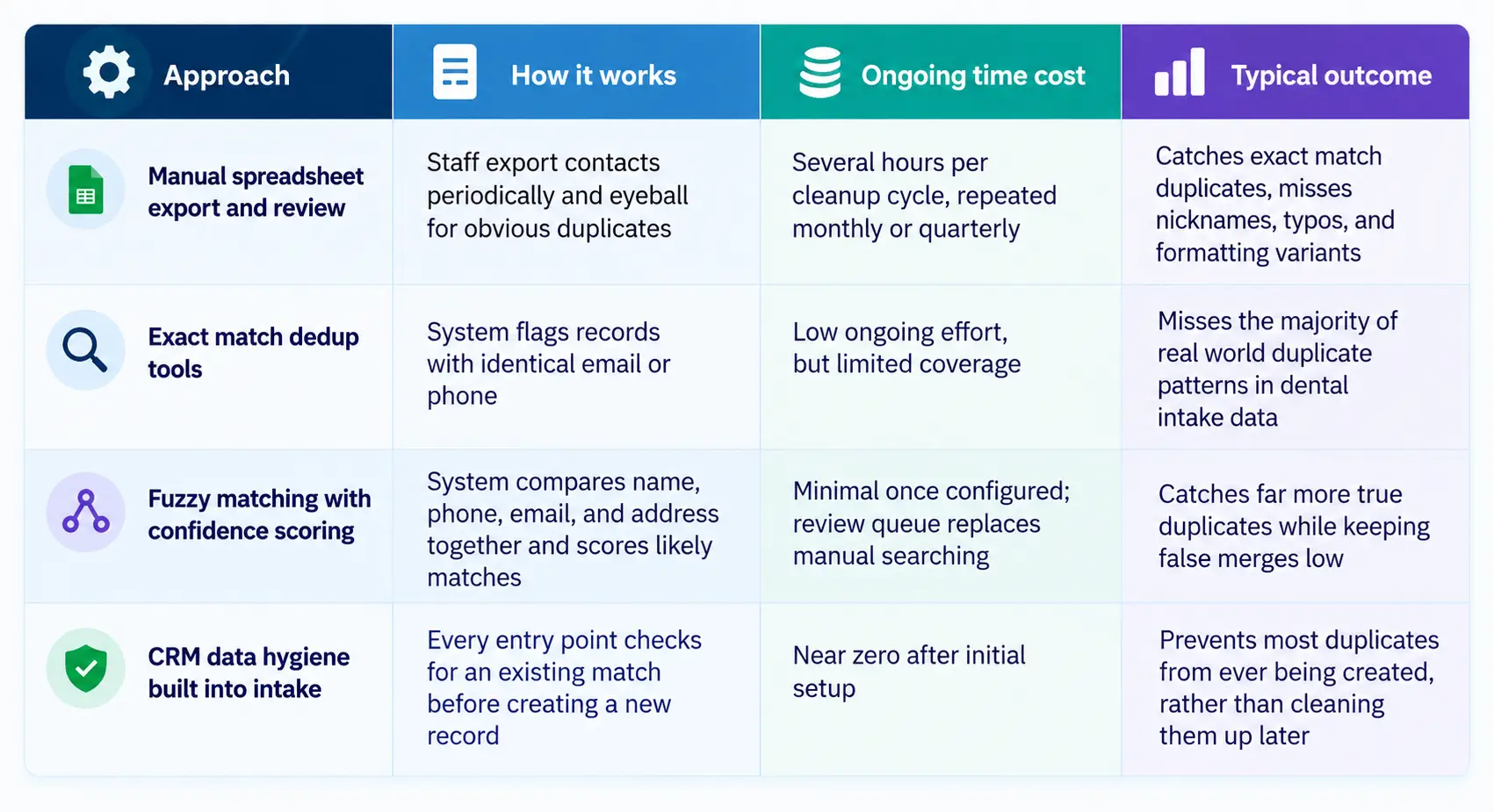
The practices that stay clean long term are the ones that move down this table, from reactive cleanup toward prevention built into the intake process itself. That shift is also what separates a practice that treats CRM data hygiene as a quarterly chore from one that treats it as infrastructure.
The upside of this work is easy to understate because it shows up as an absence rather than a win. You stop seeing phantom growth in your contact count. Your cost per lead by channel starts reflecting reality instead of whichever source happens to generate the most duplicate entries. Front desk staff stop wasting time confirming whether a caller is actually new. And when a partner or DSO leadership team asks which channel is actually driving booked treatment value, the answer comes from a report you can trust rather than one you have to caveat.
None of that requires new ad spend or a bigger marketing team. It requires treating the CRM itself as infrastructure worth maintaining, the same way you would treat scheduling software or your phone system. For more on how clean CRM data connects to the reporting layer above it, see why dental marketing ROI falls without proper attribution.
How often should a dental practice audit CRM data?
Run a lightweight duplicate check monthly and a full audit with fuzzy matching quarterly. High volume practices or DSOs with more than one intake source should lean toward monthly full audits, since duplicate risk scales with the number of separate systems feeding the CRM.
Does CRM data hygiene have HIPAA implications?
Yes. Duplicate and fragmented patient records increase the risk of protected health information being attached to the wrong contact, sent to the wrong recipient, or retained inconsistently across records that should have been merged. A clean, deduplicated CRM is also a more defensible CRM from a compliance standpoint, since you can account for exactly where a given patient's data lives. Our guide on dental HIPAA violations and our overview of HIPAA compliant texting cover the communication side of this in more detail.
What is the fastest way to find duplicate records in a dental CRM?
Export your contact list and run it through a fuzzy matching tool that scores likely duplicates by comparing name, phone, email, and address together rather than requiring an exact match on any single field. This surfaces the misspellings, nicknames, and formatting inconsistencies that exact match searches miss, and it is the same method used in step one of the cleanup process above.
Does CRM data hygiene look different for a DSO versus a single location practice?
Yes, mainly in scale and sync complexity. A single location practice usually has one or two entry points feeding the CRM, so duplicate risk is lower and a quarterly audit is often enough. A DSO managing multiple locations has to account for patients who visit more than one location, PMS instances that may not sync with each other in real time, and separate front desk teams entering data independently. For groups with more than one location, matching rules need to check across the entire organization, not just within a single location's contact list.



October 28, 2026
8 min
How traditional voicemail loses new dental patients, and what a reliable call-handling system looks like instead.

October 28, 2026
8 min
Six ways dental practices can handle phone and text cancellations, fill the gap, and turn cancellations into rebooked appointments.

October 28, 2026
9 min
How to connect Google Business Profile call tracking with PMS data to see which calls turn into booked patients and realized production.
Sign Up Now & Someone from Our Team Will Be in Touch Shortly!
Use the form below to send us a message, and we’ll get back to you as soon as we can.
.webp)
Track every marketing dollar and optimize patient conversions with ConvertLens. Gain valuable insights from your campaigns, ensuring you never miss a potential patient. Maximize ROI and grow your practice effortlessly.
-p-500.webp)