October 28, 2026
8 min
How traditional voicemail loses new dental patients, and what a reliable call-handling system looks like instead.
October 28, 2026
9 min
How to connect Google Business Profile call tracking with PMS data to see which calls turn into booked patients and realized production.
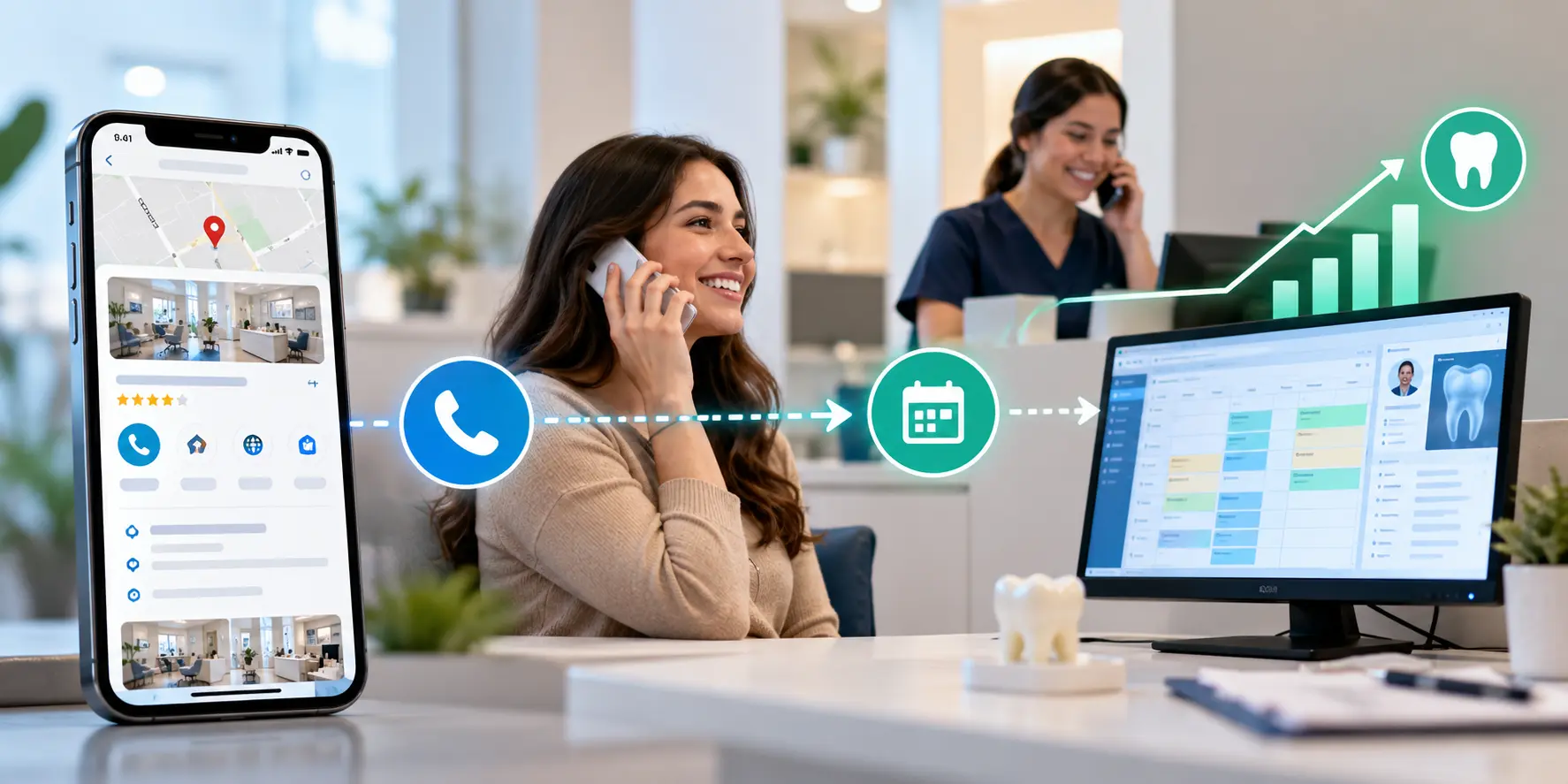
A phone call from your Google Business Profile call tracking setup can be the first step toward a new patient, but the call itself tells you very little about what comes next. Did the caller schedule an appointment? Did they show up? And did that visit translate into production for your dental practice?
Google Business Profile call tracking helps you see how many calls your local listing brings in and gives you a clearer picture of how patients find and contact your practice.
The real value comes from following those calls beyond the first conversation. Call counts show how often people reach out, but your appointment and production records tell you which inquiries turned into actual revenue.
Your Google Business Profile tracks call activity, while your practice management system (PMS) records appointments and treatment. Connecting the two helps you trace calls through to booked patients and realized production, giving you a better way to judge the return on your local SEO efforts.
This guide covers how to track Google Business Profile calls, which metrics deserve your attention, and how to connect call data with actual appointments and production.
When someone finds your dental practice on Google Search or Maps and calls your office, call tracking helps you record that inquiry and identify where it came from. With call tracking, you can then compare these call records with your appointment data to see which inquiries turned into booked appointments and brought new patients through your door.
Here's how the journey works:
Google Search or Maps → Google Business Profile → Phone call → Appointment → Patient production
For example, a local patient searches for a dentist nearby, finds your practice listing, and calls to ask about booking an appointment. Your call tracking setup records the call and, when the tracking method supports it, identifies Google Business Profile as the source. Your front desk books the patient, and your PMS records the appointment and subsequent treatment.
Matching these records gives you a clearer view of what happened after the phone rang. You can check how many callers booked appointments, how many became patients, and how much production those patients generated.
A more complete tracking process looks like this:
Google Business Profile → Tracked call → New patient inquiry → Booked appointment → Realized production
Google Business Profile performance data alone won't show you which callers became patients or how much treatment production they generated. You'll need call tracking records and reliable PMS data to connect those outcomes with your local SEO activity.
When people look for a dentist nearby, Google Business Profile lets them check reviews, compare practices, get directions, and call your office without visiting your website. For some patients, that listing is all they need to decide whom to contact.
Searches like “emergency dentist near me,” “Invisalign provider near me,” or “dentist that accepts Delta Dental” can bring people to your listing when they're looking for a practice that meets their needs.
Several factors can prompt someone to call your practice through Google:
These calls can bring in new patients, but you won't know how many without tracking what happens after the phone rings.
Calls from your Google Business Profile can easily get mixed in with website inquiries, paid ad calls, and referrals. Tracking them separately helps you see which callers booked appointments and how much production those patients generated, giving you a clearer picture of your local SEO results.
A Google Business Profile can bring new patients to your practice, but the number of calls it generates doesn't tell you how much treatment those patients eventually receive. To measure that contribution, you need to connect the original inquiry with patient appointments and completed treatment in your practice management system (PMS).
Here's how to build a tracking process that gives you a clearer picture of the business coming from your local search presence.
Start by choosing a call tracking service that assigns a dedicated number to your Google Business Profile. When someone calls that number, the service forwards the call to your office and logs the details, giving you a record of calls attributed to your listing.
If you also run Google Ads or other campaigns, check how your provider distinguishes calls from each channel. Separate attribution makes it easier to compare results without relying on callers to remember where they found you.
Before updating your profile, review Google's current phone-number guidelines and your provider's instructions. Keep your main business number available where supported, and make sure your contact information remains accurate across your website and directories.
A patient might find your practice on Google, visit your website to compare treatments, and call after reading about your services. That journey differs from someone who calls directly from your Business Profile, so it's worth tracking the two separately.
Dynamic number insertion (DNI) can help. It displays a tracking number to website visitors based on how they arrived, allowing your tracking platform to attribute calls to sources such as organic search or paid advertising when configured correctly.
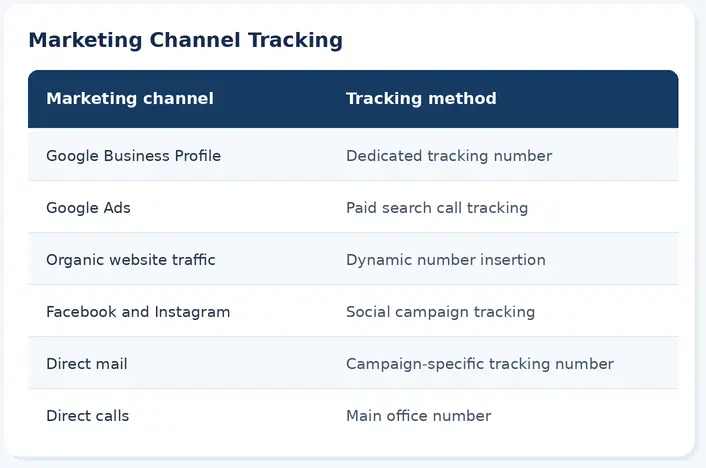
Choose the setup that fits your marketing channels and reporting needs. You don't need a separate number for every source if your existing platform can distinguish them reliably.
Once calls are being tracked, look at what each conversation leads to. Your reports should help distinguish a prospective patient asking about treatment from an existing patient calling to confirm an appointment.
Capture the details that support that distinction:
For example, if a prospective patient asks about dental implants but doesn't schedule during the call, your team can record the inquiry for follow-up. If the patient books, that outcome can be recorded as well.
If you use call recordings or transcripts, check applicable consent and privacy requirements and confirm that your provider supports your practice's HIPAA obligations, including a business associate agreement (BAA) where required.
Your PMS holds the patient and treatment information you'll need later, so give each new patient's marketing source a clear place in the record.
Ask new patients, “How did you hear about our practice?” Then select a standard source in your PMS, such as:
Use consistent options across your team. This makes it easier to group patients by source when you run reports, rather than sorting through free-text answers that may describe the same channel in different ways.
The patient's answer can also add context to your digital tracking. Someone may discover your practice on Google and call later using a saved number, so the source they report may not match the last tracked interaction.
With call logs and patient records available, you can begin linking inquiries to the appointments that follow.
If your call tracking platform integrates with your dental PMS or CRM, check whether it can pass call details and source information into patient records. If it doesn't, compare call logs with new-patient and appointment reports manually, using details such as phone numbers, names, and dates.
Once you've matched the records, follow the patient's progress:
This gives you a record of what happened after the initial call and provides the connection needed for production reporting.
With patient records linked to their acquisition sources, you can use your PMS to review completed treatment by channel.
A useful monthly report might include:
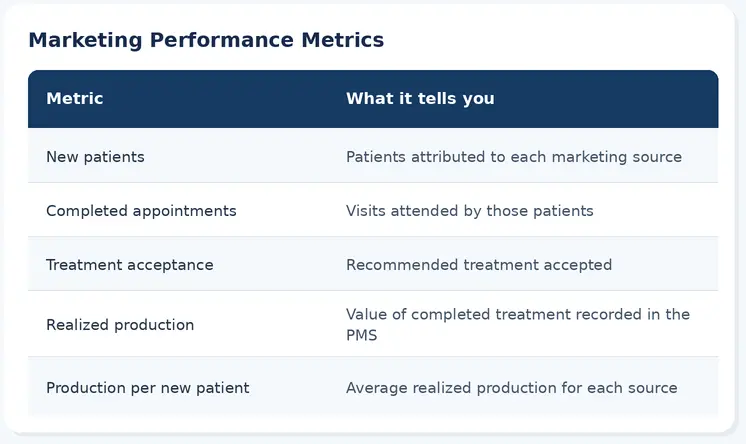
For example, say your records show that 20 patients attributed to your Google Business Profile generated $60,000 in completed treatment during the reporting period. That equals an average of $3,000 in realized production per patient in that group.
The figures are illustrative, and the result depends on the patients included and the period measured.
Your PMS may show several financial figures for the same group of patients. Each represents a different stage of treatment or payment:
Use realized production when measuring completed treatment. Scheduled production can help you understand upcoming demand, while collections show how much money has been received. Keeping these figures separate makes your marketing reports easier to interpret.
Once a month, bring your marketing and PMS reports together. Each system answers a different question, and reviewing them side by side helps you understand how your local SEO activity relates to practice performance.
Google Business Profile: Profile views and available search visibility data, website clicks, direction requests, and call-related interactions reported by Google.
Call tracking platform: Calls attributed to your listing, answered and missed calls, new-patient inquiries, and appointments booked from calls.
PMS: New patients by source, appointment attendance, treatment acceptance, realized production by source, and average realized production per new patient.
You can also compare local SEO costs with the number of new patients attributed to those efforts to estimate acquisition cost. If your practice serves several neighborhoods, location-based rank tracking can help you assess visibility across different ZIP codes, where search results may vary by location.
Look for changes that help explain your results. For example, if call volume stays steady but bookings increase, your front desk may be converting more inquiries. If new patients increase but realized production doesn't rise at the same pace, reviewing treatment and attendance data may provide useful context.
A few details make a difference when you're setting up reports:
When your call tracking and PMS reports are connected, you can assess Google Business Profile performance using patient and treatment data, not just the number of calls received. That gives you a more complete basis for evaluating your local SEO investment and deciding where to focus your marketing efforts.
How is a Google Business Profile call different from a website call?
A Google Business Profile call comes from someone who tapped "call" directly on your listing in Search or Maps, often without ever visiting your website. A website call usually follows a visit to your site, where the caller may have compared services or pricing first. Tracking the two separately shows which channel is actually driving the call.
Do I need a separate phone number for my Google Business Profile?
A dedicated tracking number is the most reliable way to attribute calls specifically to your Business Profile, especially if you also run paid ads or other campaigns. If your tracking platform can distinguish sources another way, a separate number isn't strictly required, but most practices find a dedicated number easier to report on.
How often should I review Google Business Profile call and production data?
A monthly review is usually enough to catch meaningful trends without over-reacting to normal week-to-week variation. Reviewing more frequently can help during a new campaign or a change in call volume, but production and treatment data typically takes a few weeks to settle.
What if my call tracking platform doesn't integrate with my PMS?
You can still match records manually by comparing call logs with new-patient and appointment reports using phone numbers, names, and dates. It takes more staff time than an automated integration, but it gives you the same connection between calls and realized production.
Can I use this process for multiple practice locations?
Yes. Set up a separate tracking number for each location's Google Business Profile, and record the location in your PMS alongside the marketing source. That lets you compare realized production by source within each location rather than blending results across your practice group.



October 28, 2026
8 min
How traditional voicemail loses new dental patients, and what a reliable call-handling system looks like instead.

October 28, 2026
8 min
Six ways dental practices can handle phone and text cancellations, fill the gap, and turn cancellations into rebooked appointments.
October 28, 2026
9 min
How to connect Google Business Profile call tracking with PMS data to see which calls turn into booked patients and realized production.
Sign Up Now & Someone from Our Team Will Be in Touch Shortly!
Use the form below to send us a message, and we’ll get back to you as soon as we can.
.webp)
Track every marketing dollar and optimize patient conversions with ConvertLens. Gain valuable insights from your campaigns, ensuring you never miss a potential patient. Maximize ROI and grow your practice effortlessly.
-p-500.webp)